
Todos
FlightFeeder Antenna Replacement
Due to a defective batch of antennas shipped in late 2014 and 2015, it is necessary that you replace your antenna for optimal operation of your FlightFeeder.
| 1FlightFeeder Antenna Kit |
Verify antenna replacement kit contents
 |
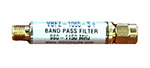
The filter is designed to optimize the ADS-B signal that the FlightFeeder receives.
 |
| 2Instalación de la antena |
- Lo mejor será que instales la antena externa en una ubicación óptima, tan alto como sea posible y lejos de obstáculos que puedan bloquear las señales de las aeronaves. Esos obstáculos pueden ser edificios, árboles y terrenos altos. Si bien la antena debe ser instalada afuera, el FlightFeeder propiamente dicho debe permanecer en el interior.
- Ajusta bien las dos arancelas tal como indican las dos flechas de abajo.
- Ajusta bien la tuerca señalada con la flecha de arriba.
- Repite este paso para cada uno de los 4 puntos de sujeción y ajusta cada punto al diámetro de tu poste tal como se muestra en la foto de abajo.
- Monta la antena deslizándola por el poste.
- Los cables coaxil son gruesos y para prevenir pérdida de señal debes evitar doblarlos.
- Conecta el cable coaxil a la antena (tal como se muestra en el punto de la foto que se ve debajo) y el otro extremo al FlightFeeder.


| 3Next Steps & More Information |
The coverage of your receiver should now be significantly improved. You can also view the receiver status through our ADS-B statistics portal.
We thank you for joining the FlightAware ADS-B network and remind you to contact us with any questions or comments.
